

Latest postsAll postsRSS

Zune 2.5 software still requires Windows Firewall!

ScHwErV

Blog author

zune-logo

Trying to update your Zune software to the latest release (Version 2.5.447.0) and getting an “Installation Failed” message? If you are, try turning the Windows Firewall on. Yes, that’s right folks, you have to turn on a firewall to update a media player. Those power users who choose to use an alternative firewall, or an external firewall are being forced to enable the built-in Windows Firewall before the software will install.

In their infinite wisdom, Microsoft has decreed that you should enable a completely separate piece of their Operating System to be able to update your Zune Media Player. This is nothing new, its been a requirement for a few releases now, but I would have thought by now that Microsoft would have learned the error of its ways.

Does the update say that you are missing a necessary component? No. Does it tell you what you have to do to make the update work? No. It gives you an innocuous message about an error and the only option you are left with is to close the installer and search the web for an answer.

Installation Failed

Setup must stop because the required package ‘Zune’ failed to install.

DIFXAPP: Rollback failed with error 0x2

Error code: 0x80070643

http://go.microsoft.com/fwlink?LinkID=101253
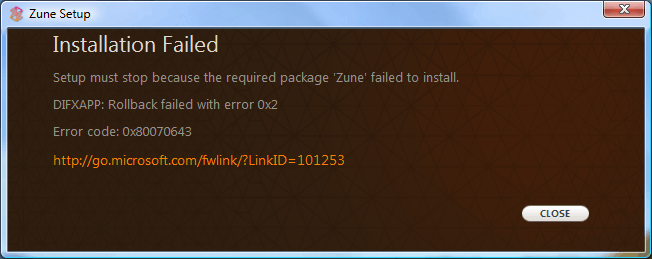
InstallFailed

Here is the answer. Go into the services control panel and start the firewall service. Run the update software from within the Zune Media Player and let it complete. Then you can go back and set your computer how you want it.

As per the typical Microsoft update process, the software resets to its defaults so that I have to go reconfigure it the way I want it. It puts shortcuts everywhere that I don’t want, don’t need, didn’t ask for, and didn’t give permission for. When will Microsoft learn that it can’t read my mind? It doesn’t have to be difficult, just a check box titled “leave my settings alone”. I would happily click that.

I love my Zune. I even like the software. Especially compared to the alternative. Unfortunately Microsoft has again chosen to take what should be a very simple operation and make it complicated.

20 comments

Comments are closed. Questions? Ask in the forum.

Patrick Hunter

#8859

Awesome! thanks very much, I probably would not have figured it out on my own. wtf microsoft?

Patrick Hunter

#3336

Awesome! thanks very much, I probably would not have figured it out on my own. wtf microsoft?

Daniel

#3492

I think you should specify operating systems involved. Both my wife and I have a Zune and use Windows XP MCE on my laptop and Vista on her laptop. Neither of us has had this issue with any updates (although she uses her zune on her desktop which uses XP Pro and I use mine on MCE, my wife also has zune software on her laptop. On both computers I had previously disabled security center notifications and the firewall service. Perhaps that has something to do with why it has not ever happened to us?

I am not quite sure your article is true for everyone. I wonder if it is also effected by what Service Pack people have. My wife laptop with Vista is using SP1 for Vista.

Daniel

#8860

I think you should specify operating systems involved. Both my wife and I have a Zune and use Windows XP MCE on my laptop and Vista on her laptop. Neither of us has had this issue with any updates (although she uses her zune on her desktop which uses XP Pro and I use mine on MCE, my wife also has zune software on her laptop. On both computers I had previously disabled security center notifications and the firewall service. Perhaps that has something to do with why it has not ever happened to us?

I am not quite sure your article is true for everyone. I wonder if it is also effected by what Service Pack people have. My wife laptop with Vista is using SP1 for Vista.

Daniel

#8861

One other note. I just checked the zune site and the firewall fix is not working for everyone.

Better double check your sources on this one. Some say enabling firewall worked, some say downloading the zune full package
http://www.microsoft.com/downloads/details.aspx?FamilyID=6136349f-2b32-4946-83b5-a09775531ef4&displaylang=en

has worked for them.

The only problems we have ever had was issued with album art etc... The way I fixed it was to find and delete the hidden zune database files after uninstalling the program they are still left sitting there. Then just reinstall. I am unsure if this would help this issue.

Daniel

#3495

One other note. I just checked the zune site and the firewall fix is not working for everyone.

Better double check your sources on this one. Some say enabling firewall worked, some say downloading the zune full package
http://www.microsoft.com/downloads/details.aspx?FamilyID=6136349f-2b32-4946-83b5-a09775531ef4&displaylang=en

has worked for them.

The only problems we have ever had was issued with album art etc... The way I fixed it was to find and delete the hidden zune database files after uninstalling the program they are still left sitting there. Then just reinstall. I am unsure if this would help this issue.

Aldo

#8862

Great ... I wouldn,t have known. I tried to install Zune 10 times, at least ... I was ready to return the unit.

THANK YOU VERY MUCH ... ALL THE LUCK TO YOU

Aldo

#3583

Great ... I wouldn,t have known. I tried to install Zune 10 times, at least ... I was ready to return the unit.

THANK YOU VERY MUCH ... ALL THE LUCK TO YOU

josh

#8863

damn this sucks i dont get how you do the firewall part
if someone could explain that would help out alot

josh

#3736

damn this sucks i dont get how you do the firewall part
if someone could explain that would help out alot

BreakTheB0x

#8865

I have an easier solution;

1. Click Start
2. Click Control Pannel
3. Double Click Add or Remove Programs
4. Select Zune Media Player
5. Click Change/Remove
6. Get another media player, and let Microsoft know why you won't bow down to their bullying.

BreakTheB0x

#3809

I have an easier solution;

1. Click Start
2. Click Control Pannel
3. Double Click Add or Remove Programs
4. Select Zune Media Player
5. Click Change/Remove
6. Get another media player, and let Microsoft know why you won't bow down to their bullying.

Johnny

#8866

This is why I love and hate Microsoft products at the same time. The average iTard user on a PC would never figure this out, but then again how many of them are disabling the windows firewall service and using another?

Johnny

#4013

This is why I love and hate Microsoft products at the same time. The average iTard user on a PC would never figure this out, but then again how many of them are disabling the windows firewall service and using another?

ZEUS_GB

#8867

Typical Microsoft kind of thing, of course it's all done for your benefit or so Microsoft says.

ZEUS_GB

#4015

Typical Microsoft kind of thing, of course it's all done for your benefit or so Microsoft says.

Luke

#8868

Great post thanks. I never had problems with the software until I tried to install it at work on Vista SP1. Enabling the firewall did the trick. Obviously this is an annoying bug by Microsoft, but all software has bugs, including that from Apple. So all of you that want to felate Steve Jobs, settle down. That goes for you BreakTheBOx, quit your crying.

Luke

#5702

Great post thanks. I never had problems with the software until I tried to install it at work on Vista SP1. Enabling the firewall did the trick. Obviously this is an annoying bug by Microsoft, but all software has bugs, including that from Apple. So all of you that want to felate Steve Jobs, settle down. That goes for you BreakTheBOx, quit your crying.